Showing posts with label Delete. Show all posts

Thursday, July 3, 2014

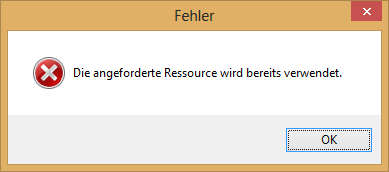
Cannot delete TCP/IP printer port because "The requested resource is in use", "Die angeforderte Ressource wird bereits verwendet" in Windows 8

I uninstalled a network printer under Windows 8, but the TCP/IP printer port was still in the list of printer ports. I tried to manually delete it form the ports list, but i got the error message "The requested resource is in use" (In german: "Die angeforderte Ressource wird bereits verwendet"). Reboot did not help.


How-I-fixed-it:
I found the right hints here: http://social.technet.microsoft.com/Forums/windowsserver/en-US/245c20bd-b6e1-4932-b91b-84fbd9767b41/can-not-delete-tcpip-printer-port-when-deleting-the-printer-on-windows-2008-server?forum=winserverprint

1. Open the registry Editor "regedit.exe"
2. Navigate to HKEY_LOCAL_MACHINE\SYSTEM\CurrentControlSet\Control\Print\Printers
3. Is the Printer deleted recently still listed there? If yes, delete the according entry in the registry
4. Restart the Spooler Service
5. Delete the TCP/IP Printer port.

P.S.
I did this, because our Network admin changed the hostname of a HP Color LaserJet 4650dn Printer and i had to re-install it on my computer.

Sunday, October 27, 2013

How to Delete/Reset Wireless/WiFi Profile in Windows 8 / 8.1, WLAN-Profil löschen unter Windows 8 / 8.1

Randomly my Laptop refused to connect my company WiFi. I wanted to delete and re-add the wireless Profile manually to see, if this fixes it. In Windows 8.1, i did not find the wireless profiles manager known from Vista or 7.

How-I-fixed-it:
Steve Sinchak wrote a blog entry how to delete a wireless Profile in Windwos 8 / 8.1 using a command prompt.
See his solution here:
http://tweaks.com/windows/65347/how-to-delete-wireless-profiles-in-windows-8/