Showing posts with label lost. Show all posts

Tuesday, June 11, 2019

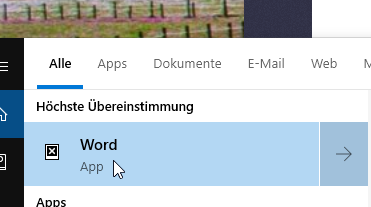
Windows 10 search app icons broken, only white cross on black background

When I do an Cortana Search on my Windows 10, all app icons in the search results are broken:


How-I-fixed-it:

Press the Start key and type the word CMD, right click on the command prompt and select Run as administrator, enter the following commands one by one followed by the Enter key: 

•- DISM.exe /Online /Cleanup-image /Scanhealth
•- DISM.exe /Online /Cleanup-image /Restorehealth
•- DISM.exe /online /cleanup-image /startcomponentcleanup
•- sfc /scannow 

Reboot.

The answer is based on:
https://answers.microsoft.com/en-us/windows/forum/all/windows-10-search-app-icons-broken-only-white/14f57c34-9cac-4cb8-a133-0680da67aae4?tm=1560262812629


Monday, May 5, 2014

Outlook categories colors are lost after data restore from backup or Outlook.com. How to backup and restore category colors?

My Outlook 2013 E-Mail Profile went corrupt and i had to create a new one to be able to start Outlook again. Calendar, Tasks and Contacts were restored from Outlook.com, but I lost all the colors of my categories.

How-I-fixed-it:
Be sure to have a backup of a .pst-file that has the category colors inside.

I copied the These instructions from:
http://www.msoutlook.info/question/611

Outlook 2007, Outlook 2010 and Outlook 2013

Outlook 2007, Outlook 2010 and Outlook 2013 store the Master Category list in the mailbox or pst-file itself so if you backup your pst-file, your Categories will be backed up as well.
This of course doesn’t allow you to easily share your Categories or use it in another mail profile. To allow for this you can use the following method;
Backup Categories
  1. Create an new Note item (keyboard shortcut: CTRL+SHIFT+N).
  2. Write “Categories” in it to give it a name.
  3. Close the Note item.
  4. Switch to your Notes folder (keyboard shortcut: CTRL+5).
  5. Right click on it and choose Categorize-> All Categories…
  6. Select all the Categories which you want to backup.
  7. Save the Note outside of Outlook as an msg-file Outlook via File-> Save as… or by dragging it out of Outlook and into an Explorer folder or onto your Desktop. By default it will be called Categories.msg
Restore Categories
  1. Open your Notes folder (keyboard shortcut: Ctrl+5).
  2. Drag & drop the Categories.msg file from Explorer into the Notes folder.
  3. Switch back to the Mail Navigation (keyboard shortcut: CTRL+1).
  4. Right click on the top of your mailbox folder set and choose Properties.
  5. Click the button “Upgrade to Color Categories…”.
    Outlook will scan your mailbox for items with Categories which aren’t in the Master Category List yet and will add them.

Monday, March 31, 2014

Vodafone EasyBox 803 forgets WLAN/WiFi key / Clients can't connect any more / Preset, Default WLAN key is not accepted

On an friend's EasyBox 803 I run into the following problem:
The WiFi was running fine for Ages, but some day he called me because the Client Computers did not connect to WiFi any more. Rebooting EasyBox and Clients did not help.

How-I-fixed-it:
I connect my Computer to the EasyBox using a LAN cable and opened the WebInterface by typing http://easy.box into my browser address bar. Login using your credentials (or the standard ones "root","123456").
Select "WLAN" in the left side menu and change the WLAN key to a new one. Save the data. Enter the new key in the client computers WiFi Connection settings. This fixed it for me.

As a side note:
I then tried to set the WLAN key back to the one printed on the backside of the router. But it did not let me set it to this value because it is not allowed to set it back to the default value once it was set to a different value. So i had to stay with the new key.