Everytime i want to logon to Windows 8, the Keyboard NumLock is disabled, which is very uncomfortable when using a PIN code to logon or having a numeric password.
I was looking for a way how to enable NumLock as default Setting for Windows Logon Screen.
How i fixed id:
I found the solution here:
http://www.techcular.com/enable-numlock-at-windows-8-startup/
http://www.thewindowsclub.com/numlock-startup-windows-7-8.
http://www.bleepingcomputer.com/forums/t/517546/windows-81-num-lock-off-at-login-screen/
Go to the registry folder:
HKEY_USERS\Default\Control Panel\Keyboard
Set the value of "InitialKeyboardIndicators" to 2.
Showing posts with label Windows 8. Show all posts
Showing posts with label Windows 8. Show all posts
Sunday, January 11, 2015

Friday, October 24, 2014
How can i change/move/re-locate the local temp folder of Microsoft OneDrive/Skydrive to a different location?
I wanted to move the local temp folder of OneDrive to a different harddrive on my computer.
How-I-fixed-it:
I found the right hints here: http://answers.microsoft.com/en-us/onedrive/wiki/sdoptions-sdfileset/change-the-onedrive-folder-location/147dade2-830b-46ee-bf7e-36a8eab9446a
How-I-fixed-it:
I found the right hints here: http://answers.microsoft.com/en-us/onedrive/wiki/sdoptions-sdfileset/change-the-onedrive-folder-location/147dade2-830b-46ee-bf7e-36a8eab9446a
Change the OneDrive Folder Location
Technical Level : Basic
Summary
Learn how to change the OneDrive folder location. This is useful if you have a limited storage capacity main drive but a separate storage drive and you want your OneDrive content synced to the separate drive. This is not for OneDrive for Business.
Details
Many people use two separate drives on their computers: a main drive like an SSD to run the operating system and other programs, and a regular hard drive to store the bulk of their content. OneDrive defaults to the C:\User\\OneDrive location, however you can change it wherever you want.
Change the OneDrive Location in Windows 8 and Previous
To change the OneDrive folder location in Windows 8 and previous versions, you have unlink OneDrive from your account and then repeat the setup process:- Right-click on the OneDrive icon in the notification area and then select Settings
- Select "Settings" and then select "Unlink OneDrive"
- Follow the setup process again and ensure to select the new drive or location to have OneDrive sync to; you must wait for your files to download again to the new location
Change the OneDrive Location in Windows 8.1
To change the OneDrive folder location in Windows 8.1, you can simply change the location directly through the Properties menu of the OneDrive folder:- Open File Explorer, right-click on the OneDrive folder in the navigation pane (left-hand side), and then select Properties
- Click the "Location" tab and then select "Move"
- Select the location where you want OneDrive to sync to and then click OK
Sunday, July 6, 2014
How can I make my Windows PC/Tablet kid safe? Where can i find a kid safe web browser? How can I hide Windows Apps from my kids on the computer?
I was looking for an Windows application to make my tablet kid safe for my three year old son. I tried with Microsoft familysafety, which works pretty OK, but did not fully satisfy me, because it still left too many things on the computer accessable (Standard apps like store etc. are still there) and iI found it too complicate to allow access to selected videos on YouTube to him.
I was looking for an application that can be placed in AutoStart under his account, runs in Kiosk mode and hides everything on the computer from him which is not declared accessable by partents. It should like his own little world on my computer with games and internet content suitable for his age.
How-Ifixed-it:
In "Magic Desktop" i exactly found what I was looking for: http://www.magicdesktop.com/en-US/Product
I was looking for an application that can be placed in AutoStart under his account, runs in Kiosk mode and hides everything on the computer from him which is not declared accessable by partents. It should like his own little world on my computer with games and internet content suitable for his age.
How-Ifixed-it:
In "Magic Desktop" i exactly found what I was looking for: http://www.magicdesktop.com/en-US/Product
Thursday, July 3, 2014
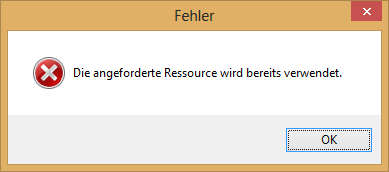
Cannot delete TCP/IP printer port because "The requested resource is in use", "Die angeforderte Ressource wird bereits verwendet" in Windows 8
I uninstalled a network printer under Windows 8, but the TCP/IP printer port was still in the list of printer ports. I tried to manually delete it form the ports list, but i got the error message "The requested resource is in use" (In german: "Die angeforderte Ressource wird bereits verwendet"). Reboot did not help.
How-I-fixed-it:
I found the right hints here: http://social.technet.microsoft.com/Forums/windowsserver/en-US/245c20bd-b6e1-4932-b91b-84fbd9767b41/can-not-delete-tcpip-printer-port-when-deleting-the-printer-on-windows-2008-server?forum=winserverprint
1. Open the registry Editor "regedit.exe"
2. Navigate to HKEY_LOCAL_MACHINE\SYSTEM\CurrentControlSet\Control\Print\Printers
3. Is the Printer deleted recently still listed there? If yes, delete the according entry in the registry
4. Restart the Spooler Service
5. Delete the TCP/IP Printer port.
P.S.
I did this, because our Network admin changed the hostname of a HP Color LaserJet 4650dn Printer and i had to re-install it on my computer.
How-I-fixed-it:
I found the right hints here: http://social.technet.microsoft.com/Forums/windowsserver/en-US/245c20bd-b6e1-4932-b91b-84fbd9767b41/can-not-delete-tcpip-printer-port-when-deleting-the-printer-on-windows-2008-server?forum=winserverprint
1. Open the registry Editor "regedit.exe"
2. Navigate to HKEY_LOCAL_MACHINE\SYSTEM\CurrentControlSet\Control\Print\Printers
3. Is the Printer deleted recently still listed there? If yes, delete the according entry in the registry
4. Restart the Spooler Service
5. Delete the TCP/IP Printer port.
P.S.
I did this, because our Network admin changed the hostname of a HP Color LaserJet 4650dn Printer and i had to re-install it on my computer.
Wednesday, June 4, 2014
Windows 8 auffrischen nicht möglich, weil Dateien fehlen / Windows 8 refresh fails because of missing files / Install Windows 8 with Product key only
A friend's Laptop went Kind of crazy, Adobe Flash was crashing all the time ("Shockwave Flash ist möglicherweise beschäftigt oder reagiert nicht mehr") and Skype refused to logon. I decided to do a "Windows refresh", but this failed because "some files are missing". We did not have an Windows DVD by hand, but we found a way to get it done.
How I fixed it:
You Need your Windows 8 Product Key for this!
Go to: http://windows.microsoft.com/de-DE/windows-8/upgrade-product-key-only
Choose the desired vesion of Windows 8 / 8.1, download and start the installation. This will refresh your system. After the Installation there will be many, many updates (106 for me) to apply!
How I fixed it:
You Need your Windows 8 Product Key for this!
Go to: http://windows.microsoft.com/de-DE/windows-8/upgrade-product-key-only
Choose the desired vesion of Windows 8 / 8.1, download and start the installation. This will refresh your system. After the Installation there will be many, many updates (106 for me) to apply!
Monday, March 31, 2014
Windows store does not show 8.1 upgrade / Cannot install because of missing admin priviliges / Administrator-Rechte Fehlermeldung
I tried to upgrade my sisters' brand new Dell laptop to Windows 8.1.
Doing that, i run into two problems:
1. Even after installing all Windows 8 updates, Windows store did not show me the 8.1 upgrade.
How-I-fixed-it:
I had to switch to start screen and type "wsreset". Right click on the search result and select "Run as Administrator".
Having done that, I rebootet the system and the upgrade was shown.
2. I started the 8.1 upgrade, but there was a message telling me, I have to logon with admin priviliges to perform the upgrade. But i was logged on as the one and only Administrator on the machine.
In German:
Sie benötigen ein Konto mit Admin-Rechten um Win 8.1 zu installieren..Melden Sie sich mit Admin-Konto erneut an und versuchen sie es erneut
How-I-fixed-it:
I manually installed Windows Update KB2871389 on the computer:
http://www.microsoft.com/de-de/download/details.aspx?id=40098
After installation and a reboot, i succesfully ugraded to Windows 8.1
Doing that, i run into two problems:
1. Even after installing all Windows 8 updates, Windows store did not show me the 8.1 upgrade.
How-I-fixed-it:
I had to switch to start screen and type "wsreset". Right click on the search result and select "Run as Administrator".
Having done that, I rebootet the system and the upgrade was shown.
2. I started the 8.1 upgrade, but there was a message telling me, I have to logon with admin priviliges to perform the upgrade. But i was logged on as the one and only Administrator on the machine.
In German:
Sie benötigen ein Konto mit Admin-Rechten um Win 8.1 zu installieren..Melden Sie sich mit Admin-Konto erneut an und versuchen sie es erneut
How-I-fixed-it:
I manually installed Windows Update KB2871389 on the computer:
http://www.microsoft.com/de-de/download/details.aspx?id=40098
After installation and a reboot, i succesfully ugraded to Windows 8.1
Friday, January 3, 2014
Outlook calendar publish to WebDav server login failed - How to change cached credentials in Windows 8
Recently I changed the password of my WebDav-Account. After that, Outlook stopped to publish my calendar to the Server. I tried to re-publish the calendar, but Outlook did not prompt me for the username / Password and still told me "Login failed".
How-I-fixed-it:
I went to system control -> user accounts -> credential manager -> windows logon credentials
There i found the setting "MSOutlookGeneric - MyWebDavServer". Open the tab and use "edit" to Change the credentials or delete the entry to let Outook prompt you for the login credentials again.
In German / Deutsch:
In der Systemsteuerung findet sich unter Benutzerkonten -> Anmeldeinformationsverwaltung -> Windows-Anmeldeinformationen "MSOutlookGeneric - MeinWebDavServer". Den Tab ausklappen unter unter "Bearbeiten" das Passwort eingeben.
How-I-fixed-it:
I went to system control -> user accounts -> credential manager -> windows logon credentials
There i found the setting "MSOutlookGeneric - MyWebDavServer". Open the tab and use "edit" to Change the credentials or delete the entry to let Outook prompt you for the login credentials again.
In German / Deutsch:
In der Systemsteuerung findet sich unter Benutzerkonten -> Anmeldeinformationsverwaltung -> Windows-Anmeldeinformationen "MSOutlookGeneric - MeinWebDavServer". Den Tab ausklappen unter unter "Bearbeiten" das Passwort eingeben.
Friday, November 22, 2013
I lost / forgot my Microsoft Office Product Key / Serial Numbere. How can i find it on my computer?
I friend called me today. He wanted to re-install his Computer, but was able to find his Office 2010 product key any more.
How-I-fixed-it:
Using the Freeware Tool ProduKey by NirSoft you can read out the Product Keys or Serials of many Microsoft products installed on your Computer.
http://www.nirsoft.net/utils/product_cd_key_viewer.html
Here's a list of supported programs:
Microsoft Windows 98/ME
Microsoft Windows 2000
Microsoft Windows NT
Microsoft Windows XP
Microsoft Windows Vista
Microsoft Windows Server 2003
Microsoft Windows 7 (Doesn't work with Microsoft Volume Licensing)
Microsoft Windows 8 (Doesn't work with Microsoft Volume Licensing)
Microsoft Office 2000 (Only ProductID is displayed)
Microsoft Office 2003
Microsoft Office 2007
Microsoft Office 2010
Microsoft SQL Server 2000
Microsoft SQL Server 2005
Microsoft Exchange Server 2000
Microsoft Exchange Server 2003
Visual Studio
How-I-fixed-it:
Using the Freeware Tool ProduKey by NirSoft you can read out the Product Keys or Serials of many Microsoft products installed on your Computer.
http://www.nirsoft.net/utils/product_cd_key_viewer.html
Here's a list of supported programs:
Microsoft Windows 98/ME
Sunday, October 27, 2013
How to Delete/Reset Wireless/WiFi Profile in Windows 8 / 8.1, WLAN-Profil löschen unter Windows 8 / 8.1
Randomly my Laptop refused to connect my company WiFi. I wanted to delete and re-add the wireless Profile manually to see, if this fixes it. In Windows 8.1, i did not find the wireless profiles manager known from Vista or 7.
How-I-fixed-it:
Steve Sinchak wrote a blog entry how to delete a wireless Profile in Windwos 8 / 8.1 using a command prompt.
See his solution here:
http://tweaks.com/windows/65347/how-to-delete-wireless-profiles-in-windows-8/
How-I-fixed-it:
Steve Sinchak wrote a blog entry how to delete a wireless Profile in Windwos 8 / 8.1 using a command prompt.
See his solution here:
http://tweaks.com/windows/65347/how-to-delete-wireless-profiles-in-windows-8/
Sunday, June 23, 2013
Install Brother Control Center 3 for DCP-560CN under Windows 8 to scan multi-page-PDF
According to Brother, ControlCenter 3 does not support Windows 8. But i like the scan multiple pages into a PDF function of it, so i wanted it back on Windows 8 as well.
How-i-fixed-it:
I downloaded the Windows 7 Version here:
http://welcome.solutions.brother.com/bsc/public/eu/de/de/dlf/download_index.html?reg=eu&c=de&lang=de&prod=dcp560cn_all&dlid=&flang=Deutsch&os=93&type2=-1
I decompresses itself into a local folder. Then I set the compatibily mode of the "Setup.exe" to "Windows 7" and installed the Software.
To make the scan to email function working with my Outlook 2010, i also downloaded and installed the Update Tool for ControlCenter3 from here:
http://welcome.solutions.brother.com/bsc/public/eu/de/de/dlf/dlf/000000/003100/dlf003176.html?reg=eu&c=de&lang=de&prod=dcp560cn_all&type2=2&os=93&flang=17&dlid=dlf003176
With the software installed, i was able to scan multiple plages into a single PDF without problems.
How-i-fixed-it:
I downloaded the Windows 7 Version here:
http://welcome.solutions.brother.com/bsc/public/eu/de/de/dlf/download_index.html?reg=eu&c=de&lang=de&prod=dcp560cn_all&dlid=&flang=Deutsch&os=93&type2=-1
I decompresses itself into a local folder. Then I set the compatibily mode of the "Setup.exe" to "Windows 7" and installed the Software.
To make the scan to email function working with my Outlook 2010, i also downloaded and installed the Update Tool for ControlCenter3 from here:
http://welcome.solutions.brother.com/bsc/public/eu/de/de/dlf/dlf/000000/003100/dlf003176.html?reg=eu&c=de&lang=de&prod=dcp560cn_all&type2=2&os=93&flang=17&dlid=dlf003176
With the software installed, i was able to scan multiple plages into a single PDF without problems.
Friday, May 31, 2013
Qt Creator qmake compile error uic: unexpected attribute alignment
After adding an ui file to my Qt Project, it did not compile any more. I received a compiler error message like uic: Error in line 51, column 41 : Unexpected attribute alignment
which then resulted into the error message:
jom: D:\MyProjectBuildDirectory\Makefile [debug] Error 2
How i fixed it:
I found out, that the problem was related to the Qt framework version 4.7.1 i used on my (Win8, 64bit) computer.
I updated to Version 4.8.4 and everything was fine again.
which then resulted into the error message:
jom: D:\MyProjectBuildDirectory\Makefile [debug] Error 2
How i fixed it:
I found out, that the problem was related to the Qt framework version 4.7.1 i used on my (Win8, 64bit) computer.
I updated to Version 4.8.4 and everything was fine again.
Wednesday, May 29, 2013
Windows 8 Crash / BlueScreen / BSOD using Internet Connection Sharing /Tethering with Nokia Lumia 920 WP8 smartphone
Today i used the Internet sharing function on my Nokia Lumia 920 WP8 phone to browse the web from my Windows 8 laptop computer (Dell M1330, Windows 8 64bit).
A few seconds after opening the Internet Explorer 10, my PC showed the Blue Screen Error BSOD (The error is Driver_IRQL_Not_Less_Or_Equal, caused by netwlv64.sys) and rebooted. This was repeatable, rebooting both devices did not help.
How-I-fixed-it:
I found the right hint here:
http://gadgets.itwriting.com/1986-fixing-blue-screen-using-internet-connection-sharing-in-windows-phone-8.html
I'm just citing this solution here:
Reboot, and before you connect to the Lumia 920 WLAN (or before it crashes), view the properties of the wireless connection. Click Advanced, and enable Federal Information Processing Standards (FIPS) for the connection. That worked for me and i did not see the BSOD again.

A few seconds after opening the Internet Explorer 10, my PC showed the Blue Screen Error BSOD (The error is Driver_IRQL_Not_Less_Or_Equal, caused by netwlv64.sys) and rebooted. This was repeatable, rebooting both devices did not help.
How-I-fixed-it:
I found the right hint here:
http://gadgets.itwriting.com/1986-fixing-blue-screen-using-internet-connection-sharing-in-windows-phone-8.html
I'm just citing this solution here:
Reboot, and before you connect to the Lumia 920 WLAN (or before it crashes), view the properties of the wireless connection. Click Advanced, and enable Federal Information Processing Standards (FIPS) for the connection. That worked for me and i did not see the BSOD again.

Thursday, January 17, 2013
PDF file indexing stopped working under Windows 8 64Bit after installing Adobe Reader XI
iFilter PDF search stops working on Windows 8 x64
Issue
Windows 8 64 bit provides native support for the PDF iFilter, which enables indexing PDFs so that they can be searched for specific text. Installing Acrobat or Reader 11.0 breaks this feature when it overwrites the Windows 8 native iFilter registry entry with the product registry entry.
How i fixed it:
Restore the registry entry to the Windows 8 native entry as follows:
1. Go to HKEY_CLASSES_ROOT\.pdf\PersistentHandler. Create the key if it does not exist.
2. Verify that the value is 1AA9BF05-9A97-48c1-BA28-D9DCE795E93C. If the Acrobat or Reader install overwrote the entry with F6594A6D-D57F-4EFD-B2C3-DCD9779E382E, return it to its original value.
3.If you have any third-party PDF iFilters installed, reinstall them.
4.Restart the Windows Search service:
a.Go to Task Manager > Services.
b.Select WSearch.
c.Right-click, and then choose Restart.
I found this solution here: http://helpx.adobe.com/acrobat/kb/pdf-search-breaks-110-install.html
Issue
Windows 8 64 bit provides native support for the PDF iFilter, which enables indexing PDFs so that they can be searched for specific text. Installing Acrobat or Reader 11.0 breaks this feature when it overwrites the Windows 8 native iFilter registry entry with the product registry entry.
How i fixed it:
Restore the registry entry to the Windows 8 native entry as follows:
1. Go to HKEY_CLASSES_ROOT\.pdf\PersistentHandler. Create the key if it does not exist.
2. Verify that the value is 1AA9BF05-9A97-48c1-BA28-D9DCE795E93C. If the Acrobat or Reader install overwrote the entry with F6594A6D-D57F-4EFD-B2C3-DCD9779E382E, return it to its original value.
3.If you have any third-party PDF iFilters installed, reinstall them.
4.Restart the Windows Search service:
a.Go to Task Manager > Services.
b.Select WSearch.
c.Right-click, and then choose Restart.
I found this solution here: http://helpx.adobe.com/acrobat/kb/pdf-search-breaks-110-install.html
Subscribe to:
Posts (Atom)